Knowledge base
Copy a previous email campaign
Created on 30 Apr 2026, Updated 09 Oct 2026 08:13
Copy a previous email campaign
You can create a new email campaign by copying a message from another event. This saves time when you want to reuse content from a previous or related event.
When is this option available?
The Copy previous campaign option appears in the New campaign dropdown only if there are existing sent, queued, or active messages in other events within the same account. If no previous messages exist, the option will not be shown.
How to copy a campaign from another event
- Navigate to Email campaigns for your event
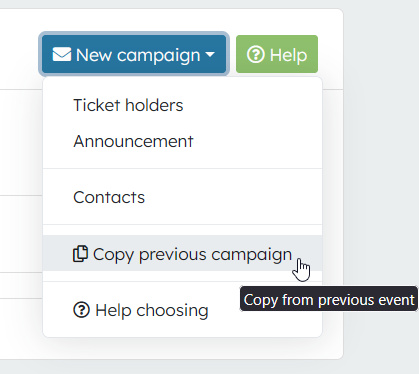
- Click the New campaign button
- Select Copy previous campaign from the dropdown menu
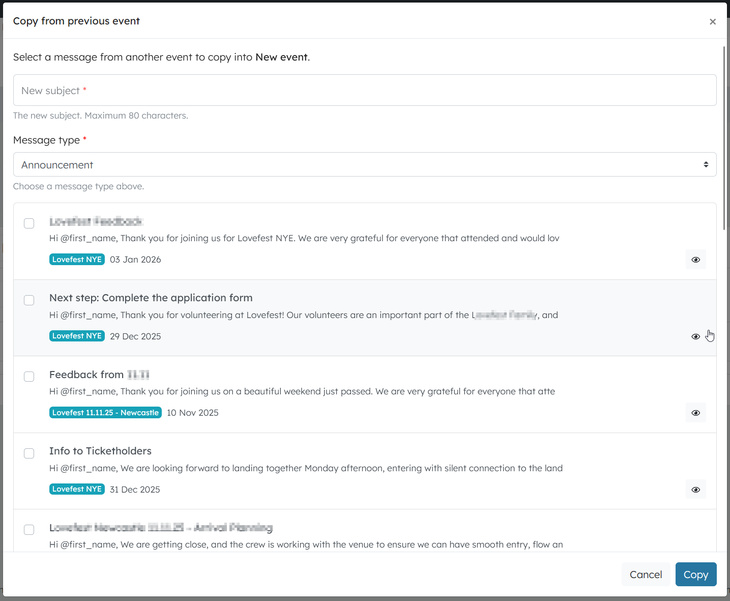
- A modal window opens showing a list of messages from other events in your organiser profile
Each message in the list displays:
- Subject — The original message subject
- Body preview — A short preview of the message content
- Event — The event the message belongs to
- Date — The date the message was sent or created
- Click on a message to select it (the selected row will be highlighted)
- Enter a New subject for the copied message
- Choose a Message type (e.g. Announcement, Ticket holders, Contacts)
- Click Copy
The message is copied into your current event as a new Draft. You can then edit the content, update recipients, and send it when ready.
Previewing a message before copying
Each message in the list includes a preview button (eye icon). Click it to open a full preview of the message content before deciding whether to copy it.
Good to know
- Copied as draft — The copied message always starts as a draft. It will not be sent until you review and send it yourself.
- Body content is copied — The full message body, format, and call-to-action settings are carried across from the original message.
- Recipients are not copied — You will need to select new recipients for the copied message, as recipient lists are specific to each event.
- Auto-sender settings are copied — If the original message was an auto-sender, the copy will be an auto-sender message.
- Permission required — You need the Create message permission to use this feature.
- Only 20 previous campaigns will be shown