Knowledge base
Invite ticket holders to volunteer by email campaign
Created on 21 Oct 2026, Updated 21 Oct 2026 15:13
Inviting ticket holders to volunteer by email campaign
Use an email campaign to invite a large audience of ticket holders to volunteer at once. The campaign adds a button that links straight to your volunteer form, and it can exclude people already registered as volunteers.
For a small, known group of contacts, the contact invitation method is a better fit.
Before you start
- Set up the event's volunteer form first — see the article Inviting contacts to volunteer for the Set up a volunteer event webform step on the Volunteers → Setup status page.
- Only ticket types that collect email addresses are available to select as recipients.
Create the campaign
- Open your event and go to Email campaigns.
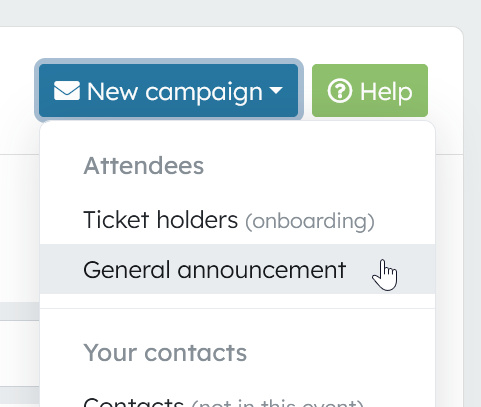
- Click New campaign and choose General announcement.
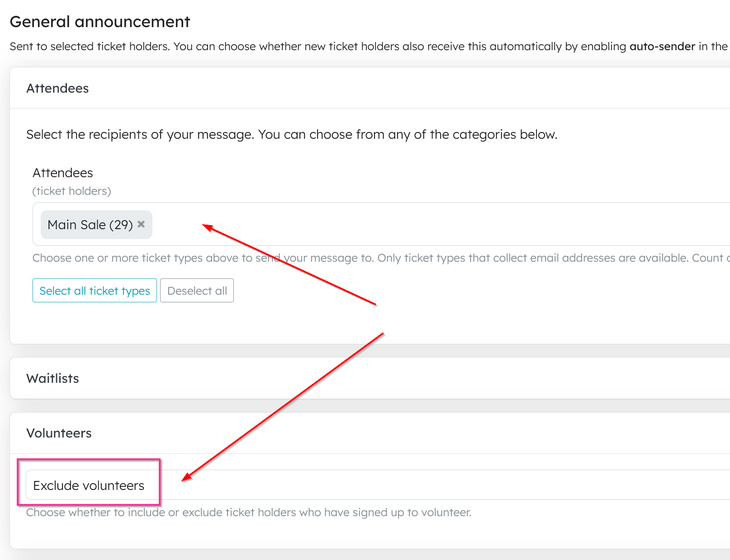
- Under Attendees, select the ticket types you want to reach.
- Under Volunteers, choose Exclude volunteers. This option only appears when the event already has volunteers.
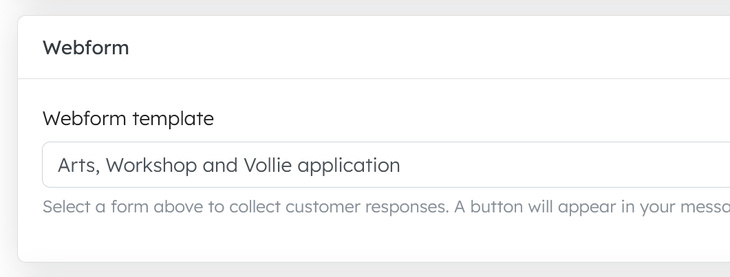
- Under Webform, choose your volunteer form from Webform template. A button linking to the form is added to the email automatically — there's no need to paste the link yourself.
- Write your subject and message.
- Use Send a test to send a copy to yourself or a team member, then click Send — or Save draft to come back later. You can also schedule a delivery time.
Things to know
- Exclude volunteers may not catch people who signed up to volunteer using a separate webform — check your audience before sending. For a small, known group, use the contact invitation method.
- The campaign does not specifically identify people who declined volunteering when buying their ticket. It targets the selected ticket types, with Exclude volunteers applied where available and subject to the limitation above.
- Recipients submit the same shareable volunteer form, so everyone is registered through the same form and no volunteer is added until someone submits it.
Related articles
Volunteer management basics
This guide walks you through the complete workflow of building and managing your volunteer roster
This guide walks you through the complete workflow of building and managing your volunteer roster
15 Apr 2026
Volunteer management overview
The Volunteer Management System provides a comprehensive solution for organising, managing, and coordinating volunteers for your events.
The Volunteer Management System provides a comprehensive solution for organising, managing, and coordinating volunteers for your events.
28 Oct 2025
Volunteer teams & roles
Learn how to organise volunteers into teams and roles, and manage team availability for your events.
Learn how to organise volunteers into teams and roles, and manage team availability for your events.
06 Dec 2025
Quick shift assignment guide
Here's your 2-minute guide to smarter rostering - when to assign, how volunteers get notified, and why waiting 1-2 weeks before your event saves everyone time. Perfect for team leads!
Here's your 2-minute guide to smarter rostering - when to assign, how volunteers get notified, and why waiting 1-2 weeks before your event saves everyone time. Perfect for team leads!
15 Apr 2026
Shift schedules
Learn how to create shift schedules that automatically generate multiple volunteer shifts based on operating hours and shift duration.
Learn how to create shift schedules that automatically generate multiple volunteer shifts based on operating hours and shift duration.
06 Dec 2025
Topics