Knowledge base
Managing your event users
Created on 14 Mar 2025, Updated 09 Oct 2026 03:16
Manage event users for your organiser profile, providing access to various management areas of your events.
To invite users to your profile, see the related article, inviting event users with invite links.
Assign roles Event manager, Event coordinator, Greeter, Collaborator and Observer
To get started, first login to the Undiscovered application and use the left sidebar navigation and click on 'Org. users'
Organiser profile users
The users page shows you a list of users that have access to your events. You can see what permissions each user has by viewing the details of their card.
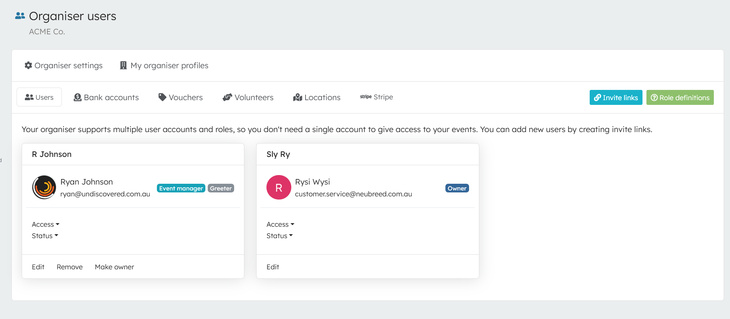
Adding a user to your organiser profile
When you edit a user, you can assign them various roles and provide access to specific events across all your events under this profile.
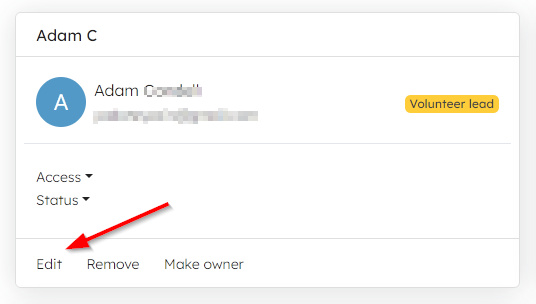
To edit a user, click on the 'Edit' link on the user's details card
Change roles for this user from the list. Below is a description of what each user role is.
Owner
The same access level as you
Event Manager
The same access level as an Owner except they can't cancel an event, delete an event or introduce changes to your organisation
Greeter
Can only access the check-in
Observer
Has access to everything, except making any changes, or performing actions. Look, but don't touch!
Event permissions
Next, choose the event that this user has access to
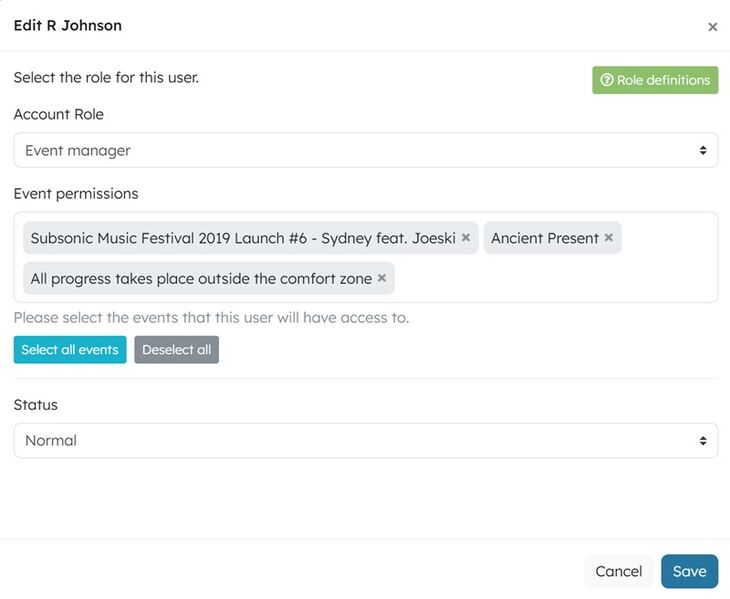
Once you've finished filling in this form, press the save button and this new user will be sent an email.
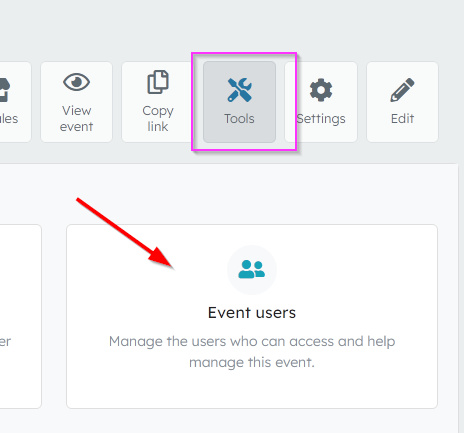
Event users
To manage which organiser users are assigned to your event, click Tools -> Event users
Modify an existing user
Related articles
A single, mobile-friendly page that brings together the most useful links for your event in one place
Template events are full copies of an event that you can reuse as a starting point for new events.
Manage event users for your organiser profile, providing access for your team to various areas of your events.