Knowledge base
Event redirects
Created on 17 Dec 2025, Updated 17 Oct 2026 21:21
Redirect event pages
Event redirects let you send people from one event page to another event page.
This is useful when you have replaced an old event with a new one (for example, a new date, a new season, or a new version of the same event) and you want anyone visiting the old link to land on the correct active event.
How redirects work
When a redirect is set:
- The old event’s public page will redirect visitors to the event you select.
- This affects anyone using the old event link (for example, from old social posts, email campaigns, tickets, bookmarks, or search engines).
- You can change the redirect at any time.
- You can remove the redirect by selecting None.
Who can set a redirect
- Event organisers can redirect an event to any active event within their organiser profile.
- Platform administrators can redirect an event to any active event on their platform.
Set or change a redirect from My events
- Go to My events.
- Find the event you want to redirect.
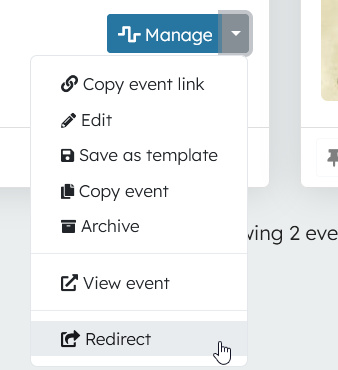
- Open the Manage dropdown menu.
- Select Redirect.
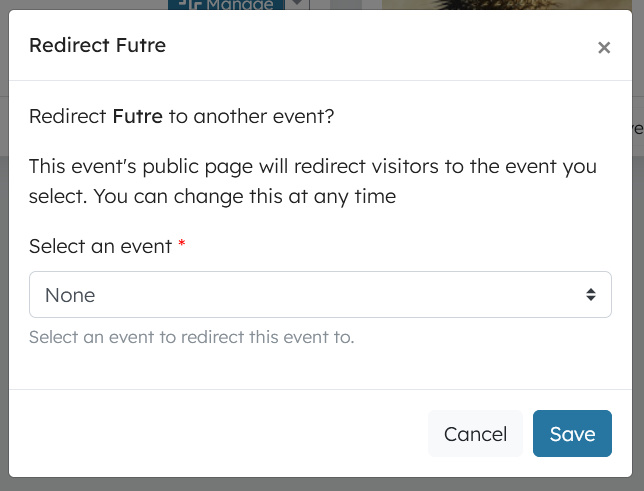
- In the modal, use Select an event to choose where the event should redirect to.
- Click Save.
After saving, the selected redirect will be applied to the old event page automatically.
Remove a redirect
To remove a redirect (so the event no longer sends visitors elsewhere):
- Go to My events.
- Find the redirected event.
- Open the Manage dropdown menu.
- Select Redirect.
- Choose None.
- Click Save.
Set up a redirect when copying an event
When you copy an event, you can set up a redirect at the same time:
- Go to My events.
- Find the event you want to copy.
- Open the Manage dropdown menu.
- Select Copy event.
- In the Redirect old event section, tick Redirect old event page to new event page?
- Complete the copy process.
When the new event is created, the old event page will redirect to the new event page automatically.

If you want to undo or change the redirect later, use the Redirect option from the old event’s Manage dropdown and select a different event or None.
Tips
- If you are running recurring events (for example, yearly festivals), redirects are a good way to keep old links working.
- Set the redirect only after you are confident the new event is the correct destination.
- If you want to keep the old event page accessible, do not set a redirect (or remove it by choosing None).
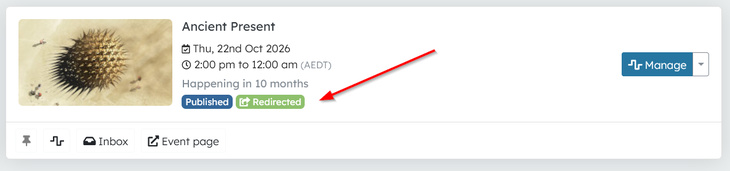
- Events with a redirect will be indicated by this badge on your My events page
Related articles
Record when something goes wrong with a person at your event, and make sure your team, and other organisers on the platform, are aware of it
A single, mobile-friendly page that brings together the most useful links for your event in one place
Template events are full copies of an event that you can reuse as a starting point for new events.