Knowledge base
Managing duplicate volunteers
Created on 27 Mar 2026, Updated 13 Oct 2026 17:45
Managing duplicate volunteers
When volunteers register multiple times or are imported from different sources, you may end up with duplicate entries. The merge feature allows you to combine these duplicates while preserving all important data and maintaining data integrity.
Understanding duplicate volunteers
How duplicates are created
Volunteers can be marked as duplicates when:
- Multiple registrations – The same person registers more than once through various forms
- Data imports – Importing volunteer data from different sources
- Manual creation – Creating volunteer entries manually that match existing ones
- Email/name matches – The system detects matching email addresses or names
Duplicate status
When a volunteer is identified as a duplicate:
- Their status is set to Duplicate (red badge)
- They appear in the volunteer list but won't be assigned to shifts
- Admin notes explain why they were flagged as duplicate
Finding duplicate volunteers
Using the duplicates filter
- Navigate to Volunteers within your event
- Click the Show duplicates checkbox in the filters or status "Duplicates"
- The table will display only volunteers with duplicate status
Identifying duplicates in the list
Duplicate volunteers show:
- Red "Duplicate" badge in the Status column
- "Merge duplicate" option in their Actions menu
- Admin notes explaining the duplicate detection

Merging duplicate volunteers
Starting the merge process
- Find a volunteer with Duplicate status
- Click the Actions dropdown / or button for that volunteer
- Select Merge duplicate
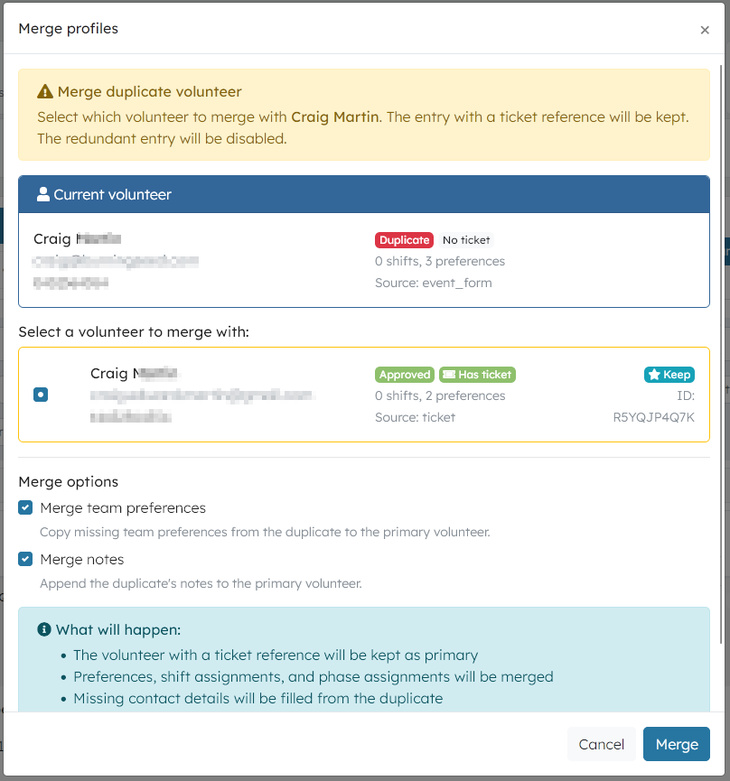
This opens the merge modal showing:
- The current volunteer details
- All potential duplicate candidates
- Comparison information to help you decide
Understanding the merge options
Current volunteer section
Shows the volunteer you selected:
- Name and contact information
- Status badge (Duplicate)
- Ticket indicator – Shows if they have an associated ticket
- Shift and preference counts
Candidate selection
Lists all matching volunteers:
- Radio buttons to select which volunteer to merge with
-
Comparison data for each candidate:
- Name and email
- Status and ticket information
- Number of shifts and preferences
- Source (how they were created)
- "Keep" badge – Indicates which entry the system recommends keeping
Merge options
Choose what to merge:
- Merge team preferences – Copy missing team preferences
- Merge notes – Append the duplicate's notes to the primary volunteer
How merging works
Primary selection logic
The system automatically determines which volunteer to keep:
- Ticket reference wins – The volunteer with an associated ticket is kept
- Earliest creation – If neither or both have tickets, the older record is kept
You can override this selection by choosing a different volunteer in the modal.
What gets merged
When you merge two volunteers:
Data preservation
- Team preferences – Missing preferences are copied from the duplicate
- Shift assignments – All assignments move to the primary volunteer
- Phase assignments – Phase participation is transferred
- Contact links – Missing contact/user connections are filled
- Optional fields – Phone, emergency contacts, etc., if missing on primary
Data updates
- Ticket reference – Primary adopts ticket if it doesn't have one
- Status – Primary becomes Active; duplicate becomes Inactive
- Notes – Duplicate's notes are appended with merge information
What happens to the duplicate
- Status changes to Inactive (grey badge)
- Notes updated with merge details and timestamp
- No longer appears in active volunteer lists
- Data preserved for audit trail
After merging
Immediate effects
- Primary volunteer appears with Active status
- Duplicate volunteer is hidden from active views
- All assignments now belong to the primary volunteer
- Success message confirms the merge
Verification steps
- Check the primary volunteer – View their profile to verify merged data
- Review assignments – Ensure all shifts are correctly assigned
- Check preferences – Verify team preferences are complete
- Look for the duplicate – Should appear as Inactive if searched
Best practices
Before merging
- Verify it's actually the same person – Check email, name, and other details
- Review assignments – Note which volunteer has more shifts/preferences
- Check ticket associations – See which entry is linked to a ticket
- Read admin notes – Understand why it was flagged as duplicate
During merging
- Choose the right primary – Usually the one with the ticket or more complete data
- Enable merge options – Keep both preferences and notes checked unless you have a reason not to
- Review the summary – The modal explains exactly what will happen
After merging
- Communicate with the volunteer – If needed, explain the merge to avoid confusion
- Update any external references – If you referenced the duplicate ID elsewhere
- Monitor for issues – Check that the volunteer can still access their portal
Troubleshooting
"No duplicate candidates found"
This means:
- No other volunteers match by email or name
- The volunteer might be incorrectly marked as duplicate
- Consider changing their status to Active instead of merging
Merge fails with error
Common issues:
- Permission denied – Ensure you have volunteer edit permissions
- Database error – Try again; if it persists, contact support
- Invalid selection – Make sure you selected a valid merge candidate
Volunteer disappears after merge
This is expected behavior:
- Primary volunteer should still be visible with Active status
- Duplicate volunteer is now Inactive and hidden from default views
- Search by name to find the inactive duplicate if needed
Assignments lost after merge
This shouldn't happen, but if it does:
- Check both volunteers – Assignments might be on the inactive duplicate
- Manual reassignment – Move assignments to the primary volunteer
- Contact support – Report the issue for investigation
Advanced scenarios
Multiple duplicates
If you have more than two duplicates:
- Merge two at a time – Start with the most complete records
- Choose the best primary – Pick the one with the ticket or most data
- Repeat until done – Continue merging until only one active record remains
Merging across events
The merge feature works within a single event scope. For cross-event duplicates:
- Merge within each event first
- Consider global merge if the system supports it
- Contact support for assistance with complex scenarios
Bulk duplicate management
For many duplicates:
- Export the data to review all duplicates at once
- Use the duplicates filter to work through them systematically
- Document your process for future reference
Related features
- Volunteer status management – Change volunteer statuses manually
- Bulk actions – Update multiple volunteers at once
- Import/export – Handle volunteer data in bulk
- Activity logs – Track all merge actions for audit purposes
Need help?
If you encounter issues with duplicate volunteers:
- Check this guide for common scenarios
- Review the volunteer profile for detailed information
- Contact your system administrator for permission issues
- Reach out to support for technical problems
Related articles
This guide walks you through the complete workflow of building and managing your volunteer roster
The Volunteer Management System provides a comprehensive solution for organising, managing, and coordinating volunteers for your events.
Learn how to organise volunteers into teams and roles, and manage team availability for your events.
Here's your 2-minute guide to smarter rostering - when to assign, how volunteers get notified, and why waiting 1-2 weeks before your event saves everyone time. Perfect for team leads!
Learn how to create shift schedules that automatically generate multiple volunteer shifts based on operating hours and shift duration.