Knowledge base
Bulk offering shifts to volunteers using messages
Created on 09 Apr 2026, Updated 07 Oct 2026 03:00
Bulk offering shifts via New message broadcast
You can bulk offer all shifts using the "New Message" broadcast feature. This targets volunteers who have selected the specific team as a preference, but have no shifts assigned yet.
Steps to send a broadcast message
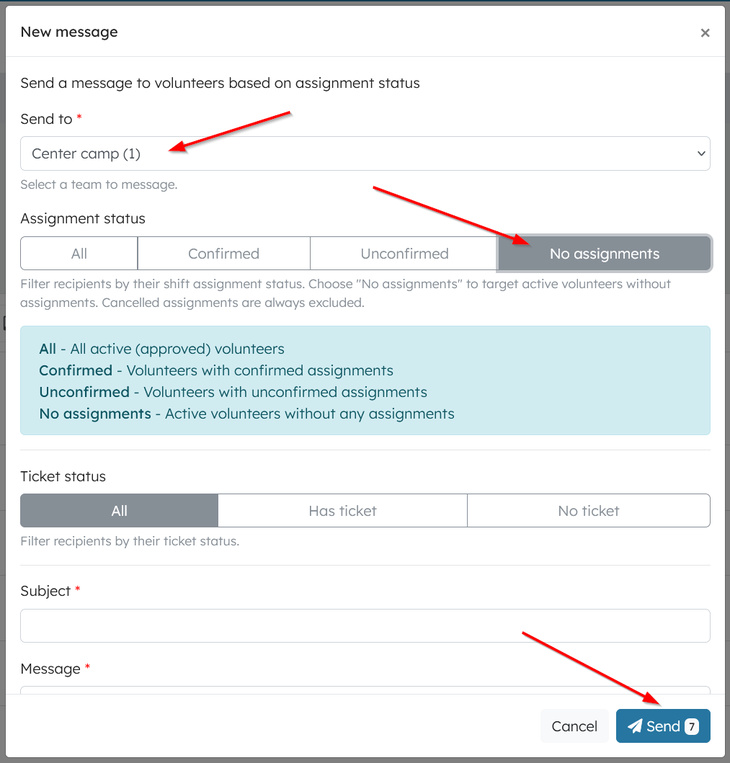
- Navigate to Volunteers → Messages and click New message.
- Select recipients by choosing the specific team (or All volunteers if permitted).
- Set the assignment status filter to "No assignments" to reach unassigned volunteers only.
- The Send button displays the exact number of recipients.
Message delivery and response
Volunteers receive an email with your custom message and a direct link to their personal portal. They can reply individually, such as with "I don't want that shift," allowing you to respond: "Pick another from the roster—you can DIY. =)" This enables efficient self-service shift claiming.
Avoiding duplicate shift offer emails
When you offer a shift to a volunteer, the email they receive includes a link to their volunteer dashboard, which already shows them every available shift in your team. This means you don't need to send a separate offer for every shift — one email is enough for volunteers to see and respond to all the team's shifts. The system automatically suppresses duplicate emails
Related articles
This guide walks you through the complete workflow of building and managing your volunteer roster
The Volunteer Management System provides a comprehensive solution for organising, managing, and coordinating volunteers for your events.
Learn how to organise volunteers into teams and roles, and manage team availability for your events.
Here's your 2-minute guide to smarter rostering - when to assign, how volunteers get notified, and why waiting 1-2 weeks before your event saves everyone time. Perfect for team leads!
Learn how to create shift schedules that automatically generate multiple volunteer shifts based on operating hours and shift duration.