Knowledge base
Assigning shifts
Created on 27 Mar 2026, Updated 15 Oct 2026 10:26
There are two ways to assign shifts: offering a shift and manual assignment.
The best way to assign or offer a shift is from a shift's view page, rather than the volunteer list. Assigning from the shift will show you eligible candidates based on their preferences.
When to assign shifts
During the event ticketing process, volunteers usually sign up gradually, then more rapidly as the event gets closer. In most cases, it’s more practical to wait until 1–2 weeks before the event to build the team roster.
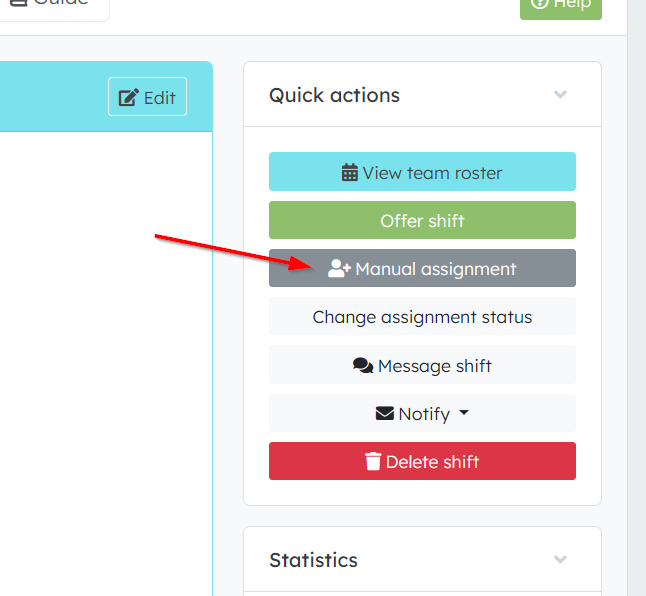
Manual assignment
- You directly assign a specific volunteer to a shift.
- The volunteer's assignment status becomes Pending (they haven't confirmed yet).
- You can choose whether to send notification emails when assigning.
- This is done by clicking the Assign button on a shift, searching for volunteers, and selecting them.
- The volunteer's team preferences are used for selection.
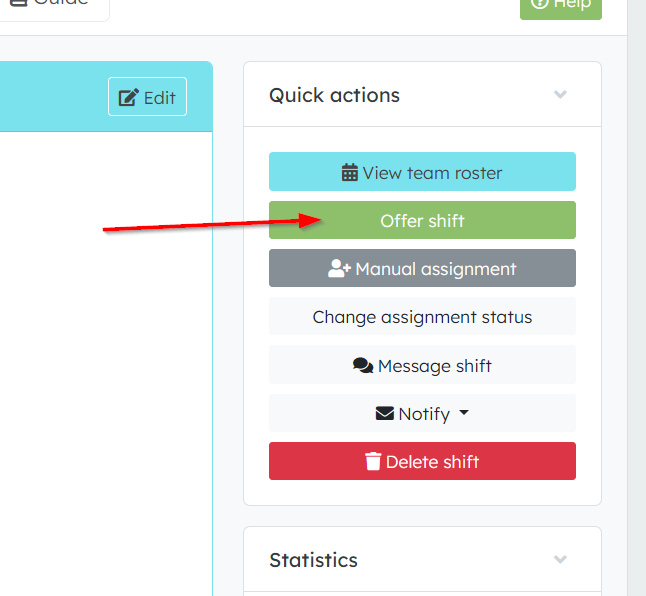
Offering a shift
- This is a notification type you send to potential volunteers.
- You're offering the shift to volunteers who might be interested.
- Volunteers can then choose to accept or decline the offer.
- This is done by clicking the Offer shift button.
- The volunteer's team preferences are used for selection. Additionally, volunteers without assignments, with any team preference can be selected
Key differences
- Manual assignment — you're putting someone on the shift (they need to confirm). Team preference constraint
- Offering a shift — you're asking if someone wants to take the shift (they can accept or decline).
When to use each
- Manual assignment: When you know exactly who should work a shift.
- Offering a shift: When you need to fill a shift and want to give volunteers the choice to volunteer for it.
After a volunteer accepts an offered shift, they would then need to confirm their attendance, changing from Pending to Confirmed status.
Email notifications
- Volunteers will be notified by email when they are offered a shift or manually assigned to one.
- They will also be notified if their assignment is removed or cancelled by a team lead.
- Volunteers will receive email notifications every time a change is made to the shift, including updates to the date, notes, or location.
Related articles
Volunteer management basics
This guide walks you through the complete workflow of building and managing your volunteer roster
This guide walks you through the complete workflow of building and managing your volunteer roster
15 Apr 2026
Volunteer management overview
The Volunteer Management System provides a comprehensive solution for organising, managing, and coordinating volunteers for your events.
The Volunteer Management System provides a comprehensive solution for organising, managing, and coordinating volunteers for your events.
28 Oct 2025
Volunteer teams & roles
Learn how to organise volunteers into teams and roles, and manage team availability for your events.
Learn how to organise volunteers into teams and roles, and manage team availability for your events.
06 Dec 2025
Quick shift assignment guide
Here's your 2-minute guide to smarter rostering - when to assign, how volunteers get notified, and why waiting 1-2 weeks before your event saves everyone time. Perfect for team leads!
Here's your 2-minute guide to smarter rostering - when to assign, how volunteers get notified, and why waiting 1-2 weeks before your event saves everyone time. Perfect for team leads!
15 Apr 2026
Shift schedules
Learn how to create shift schedules that automatically generate multiple volunteer shifts based on operating hours and shift duration.
Learn how to create shift schedules that automatically generate multiple volunteer shifts based on operating hours and shift duration.
06 Dec 2025
Topics